Availability
Availability controls the small Online / Offline badge in the chat widget. You decide what visitors see — independently of whether a teammate happens to have the inbox open.
Find it
Dashboard → Settings → Availability. There are four modes.
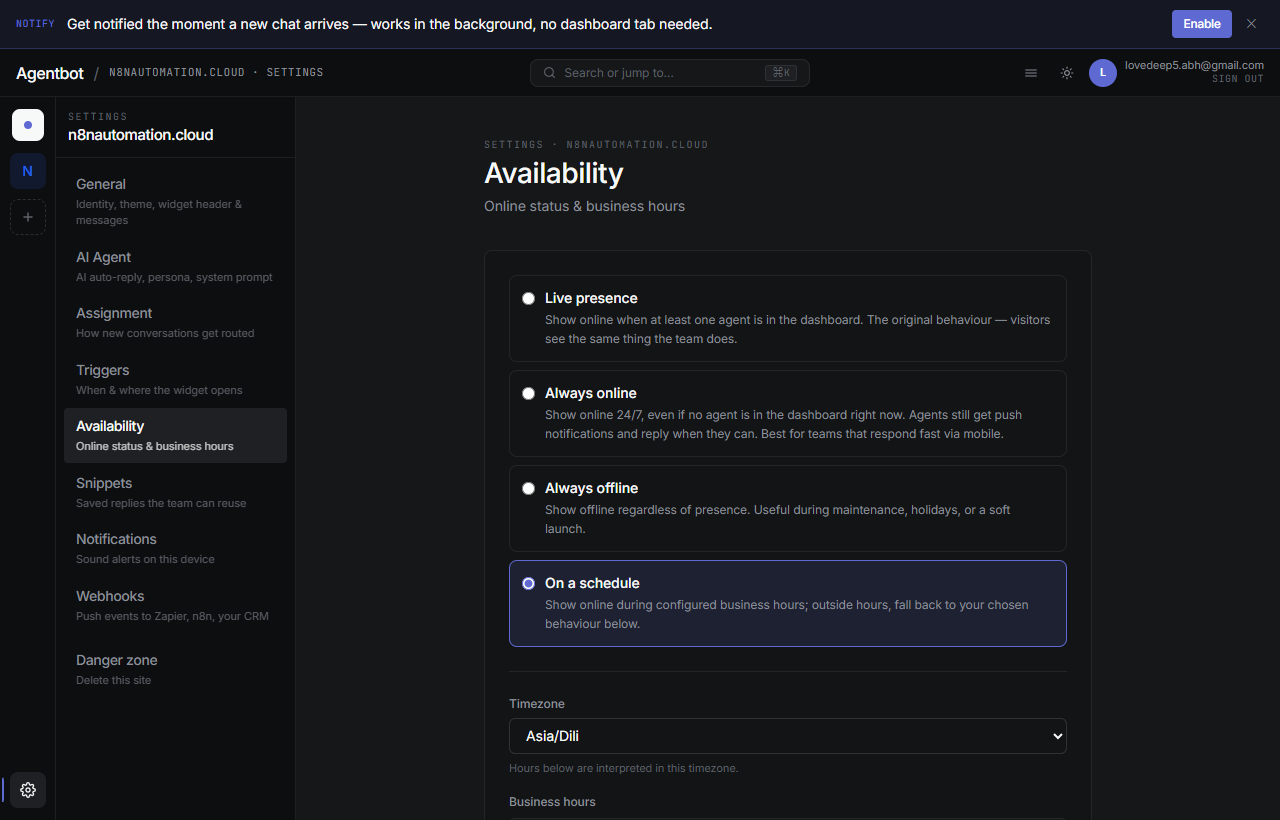
The four modes
Realtime (default)
The widget shows Online only when a teammate has the inbox open right now. The moment everyone closes the tab, it flips to Offline. Best when you actually staff chat during certain hours and want to be honest about presence.
Always online
The widget always shows Online, no matter who's actually watching. Use this when you have the AI handling the bulk of replies and you want to look responsive 24/7.
Always offline
The widget always shows Offline. Visitors still can message — they just see expectations-managed copy. Useful for businesses where you want chat as a backup channel but don't want to imply realtime presence.
Scheduled
You set business hours per day (e.g. Mon–Fri 9–17, weekends off). Inside those hours the widget shows Online; outside, you choose what happens:
- Offline — show Offline outside hours.
- Realtime — fall back to real agent presence outside hours (so if someone's on at 11pm, it still shows Online).
Schedules respect the timezone you set in the same panel — usually your business's home timezone.
Which mode should I pick?
| If you… | Use |
|---|---|
| Only run chat during office hours | Scheduled |
| Have the AI handle most chats and want to look always available | Always online |
| Want the badge to be ruthlessly honest | Realtime |
| Don't monitor chat at all but want it as a backup | Always offline |
What visitors see
The Offline message is configurable. In Settings → General → Offline message, set a short note that appears in the chat when the widget shows Offline (e.g. “We're away until 9am Monday — leave a message and we'll reply first thing.”).
How this interacts with the AI
The AI's behavior subtly changes based on the mode. See AI agent for details — the short version:
- Realtime / scheduled (in hours): AI hands off to a human when stuck.
- Always online: AI files a ticket when stuck — never claims a human is on the way if none might be.
- Offline / scheduled (out of hours): AI behaves the same; the badge just sets the visitor's expectation.